Photo Run: develop the photos after the lap, not during it
· 5 min read · game-dev, three.js, webgpu, racing, performance
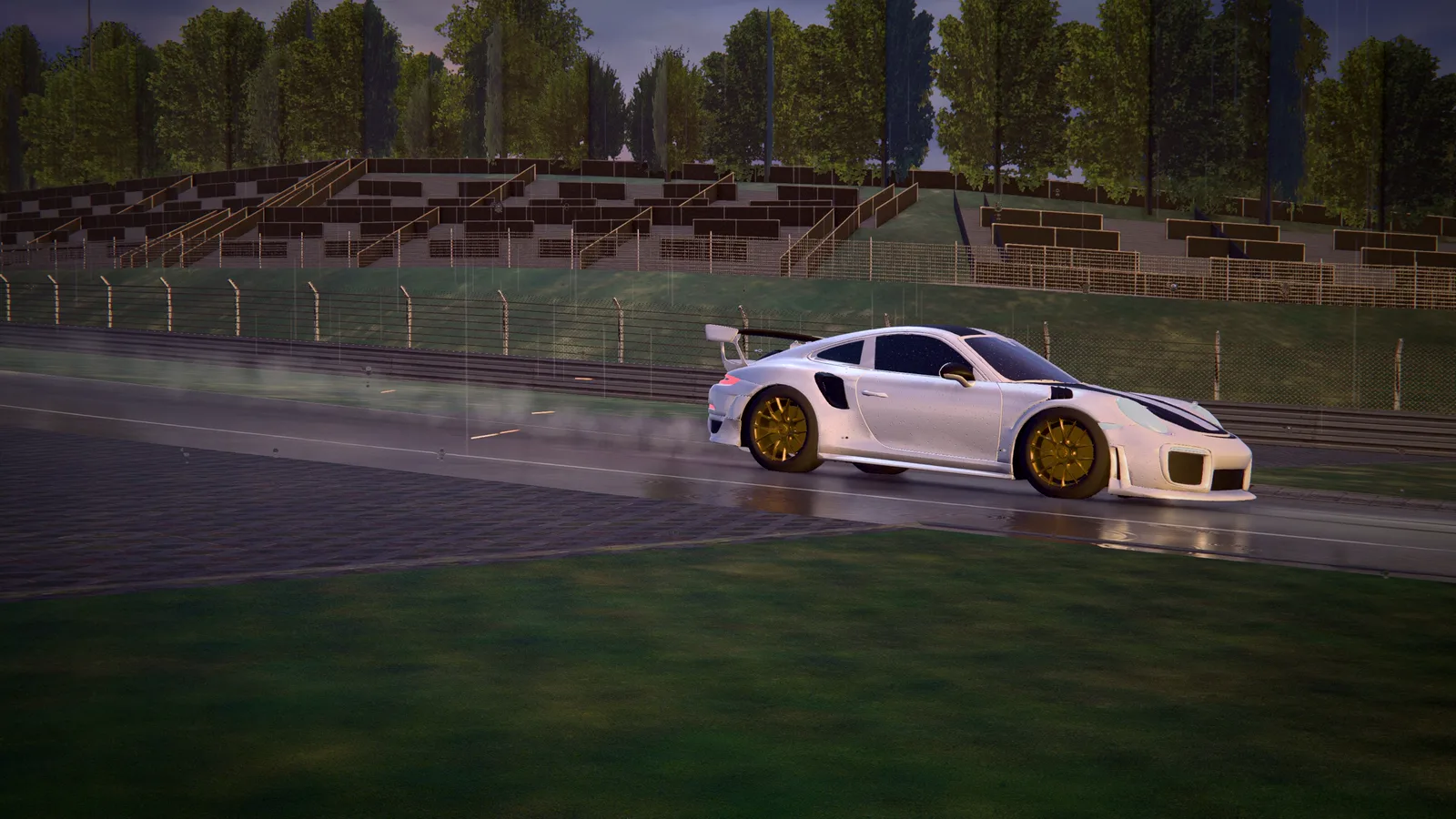
Photo Run is a mode of Endurance Racing for desktop. You drive one lap with eight photographers standing along the circuit. A few seconds before each one the screen counts down, the shutter fires as you pass and you keep driving. At the finish line the game plays your lap back with broadcast cameras, shows each photo as the replay reaches it, and lets you save them as JPEG files.
The design came from a constraint: while you drive, this mode must cost almost nothing. Every heavy part exists only on the review screen.
Record first #
During the lap the game does one thing: it copies the car's pose into an array that was allocated before the lap started. The pose is what is on screen, the root's position and rotation and the pivots of the wheels (suspension, spin and steer), plus the speed and four flags (brake, reverse, nitro, drift). It samples by simulation time, one pose every 1/60 s, so a 60 Hz and a 144 Hz display record the same lap.
| While driving | Cost |
|---|---|
| One pose copy per simulation step | 0.09 µs, which is 0.005 ms per second of driving |
| Memory | about 5.5 KB per second, 0.9 MB for a 2:40 lap |
| The HUD | five DOM nodes, opacity and transform only |
| New meshes, materials, passes, lights or shaders | none |
That last row is the one that matters most to me. Nothing new is compiled for this mode, so there is nothing for an iPhone's GPU budget to pay, and no chance of a hitch in the middle of a corner.
Where the photographers stand #
The spots are computed, not placed by hand. The planner looks for the biggest changes of heading on the lap, measured as the turn over 35 meters either side, never closer than 0.62 times the average gap between spots and clear of the start line and the end of the lap. If there are fewer corners than spots, the longest gaps are filled with spots on straights. It is deterministic, and on the Nürburgring it picks eight corners, the closest pair 456 m apart.
For the next pending spot, the HUD estimates the time of arrival from the distance and your speed. From 5 seconds, and at most 460 meters away, it shows PHOTO IN 3 and the corners of a viewfinder close in. The shot is taken when the car's position along the lap crosses the spot within 45 meters of the centerline, and the exact instant is interpolated inside the simulation step. A respawn is not a crossing, so a spot you pass that way is marked as missed.
Why the photo is not taken at the shutter #
The obvious way is to render the scene again from a photographer's camera at the moment you pass. I did not do it for two reasons. It is a second render of the whole scene in the middle of a corner, which is a hitch. And with temporal anti-aliasing the frame is a blend of previous frames, so a camera that jumps would give a smeared picture.
Instead, the photo is developed afterwards from the recording. For each shot, the review screen:
- puts a camera where a photographer would stand: a long lens, 23 to 31 degrees, outside the corner (the outside of a left-hand corner is on the right), or low at the side of a straight, aimed at the car at the shutter;
- writes the recorded pose into the car at the exact instant of the shot;
- renders 12 frames so that the post-processing history settles;
- reads the canvas, adds a thin data strip like the back of a camera (brand, photo number, speed, DRIFT or NITRO) on a 2D canvas, and encodes a JPEG and a 560 px thumbnail.
The same recording always gives the same photo. Developing takes about 275 ms per photo, 2.2 seconds for eight at 2400×1350, once, behind a "developing" screen.
Reading a WebGPU canvas #
There is one trick in step 4. A WebGPU canvas hands out its frame only in the task that drew it. Ask for a bitmap later and the swap-chain texture is gone. So the review reads the canvas in a hook that runs right after the frame was submitted:
function afterRender() {
  if ( pendingCapture ) {
    const p = pendingCapture;
    pendingCapture = null;
    // the bitmap is taken in this task, right after the frame was submitted
    createImageBitmap( renderer.domElement ).then( p.resolve, p.reject );
  }
}
(This is trimmed from the real function, which also counts frames for the 12 settling frames.) The render loop calls it after the post-processing has drawn.
The replay #
The playback has two modes. Highlights is one clip per photo, 6.2 seconds before the shot and 3.6 after, with overlapping clips merged. Full lap is the whole recording. The timeline has a diamond for each photo.
A clip is a small program of segments: a filler camera, the photographer's camera from 2.3 seconds before the shot to 1.2 after, another filler. The cameras are chase, fly-by (a trackside rig that stands where the car will be), helicopter, side tracking, low front, low rear and orbit, and the cuts go through a short dip to black, which also hides the first frames of the temporal anti-aliasing. Around each shutter the playback slows to 0.32 times, the shutter sounds, the screen flashes and a photo card comes up with a Save button.
Rules I wrote down #
- No second scene render and no new program. A photo is read from the review's frame, and the review reuses the context of the main pass. A 3D photographer would have to be an instanced layer compiled at startup, never a mesh created when a spot comes up.
- Free cameras. The speed blur reads the car's speed and the paused physics leaves it at its last value, so the review sets it to zero every frame.
- Flat DOM over the canvas. Safari on iPhone draws the page in the same GPU process as the WebGPU device. The panels use only opacity and transform, with no
filter, no blur and no animated shadow. - Desktop only, and entering a public room turns the mode off.
- Memory only. The photos live in memory, 0.3 to 0.9 MB each, and their URLs are revoked when the review closes.
What is missing #
The engine is silent in the review, because the audio is paused together with the physics, and tire smoke, skid marks and exhaust flames are not replayed, because they are effects of the physics car. I would like a score per photo, a 3D photographer with a flash and a shareable video of the replay. The last one is closer than it sounds: the rig I use to film the launch trailer already films the game frame by frame.
Photo Run is in Endurance Racing, and the project page is here.
Related projects
- Endurance Racing — Rain-soaked GT3 racing for the browser